If you’ve ever prepped for IGCSE or GCSE exams, you know past papers are the best resource there is, and also kind of a pain to actually use. Each one is a single PDF with every question mashed together, front cover, blank pages, and instructions included, and the mark scheme lives in a completely separate file. If you just want to drill, say, every geometry question that’s ever shown up on a Cambridge Maths paper, you’re stuck opening a dozen PDFs and manually screenshotting the bits you care about. Fine to do once. Miserable to do fifty times.
So I wrote Past Paper Cropper to do that part for me.
What it does
You point it at a folder of past papers, however Cambridge or AQA hand them to you, subject folders full of PDFs, and it goes through every one, figures out where each question starts and ends, and saves each as its own cropped image. If a question spills across a page break, it stitches the pieces back into a single image instead of cutting it off halfway through a diagram. It also matches each question paper up with its mark scheme automatically, so every crop comes with the number of marks it’s worth, without me having to open the mark scheme at all.
Everything lands sorted by subject and paper, with a small metadata file tagging along that records the exam board, subject, and which pages each question came from.
The hard part was figuring out where a question actually starts
The PDFs don’t come with any structure you can just read off, they’re rendered pages, not tagged documents. So the detector works off the raw text spans PyMuPDF pulls out of each page: it groups spans into lines based on vertical position, then groups lines together based on whether there’s a big enough question-number-shaped gap at the start. Sounds straightforward until you hit two-column layouts, tables, embedded diagrams, and questions that reuse the same visual formatting as the page header.
I actually shipped multi-column detection at one point, since a lot of AQA papers use two columns, and it kept producing broken crops that sliced a question in half because it couldn’t reliably tell “two columns of text” apart from “two separate questions sitting side by side.” Eventually I just disabled it and accepted single-column detection as the safer default. Sometimes the boring, more conservative heuristic wins.
There’s also a step that paints over the printed question number in the crop and strips it out, which turned out to matter more than I expected. It’s a small thing, but it’s much cleaner to have crops that just show the question itself, no “12” hanging off in the corner from the original layout.
From a script to something people can actually use
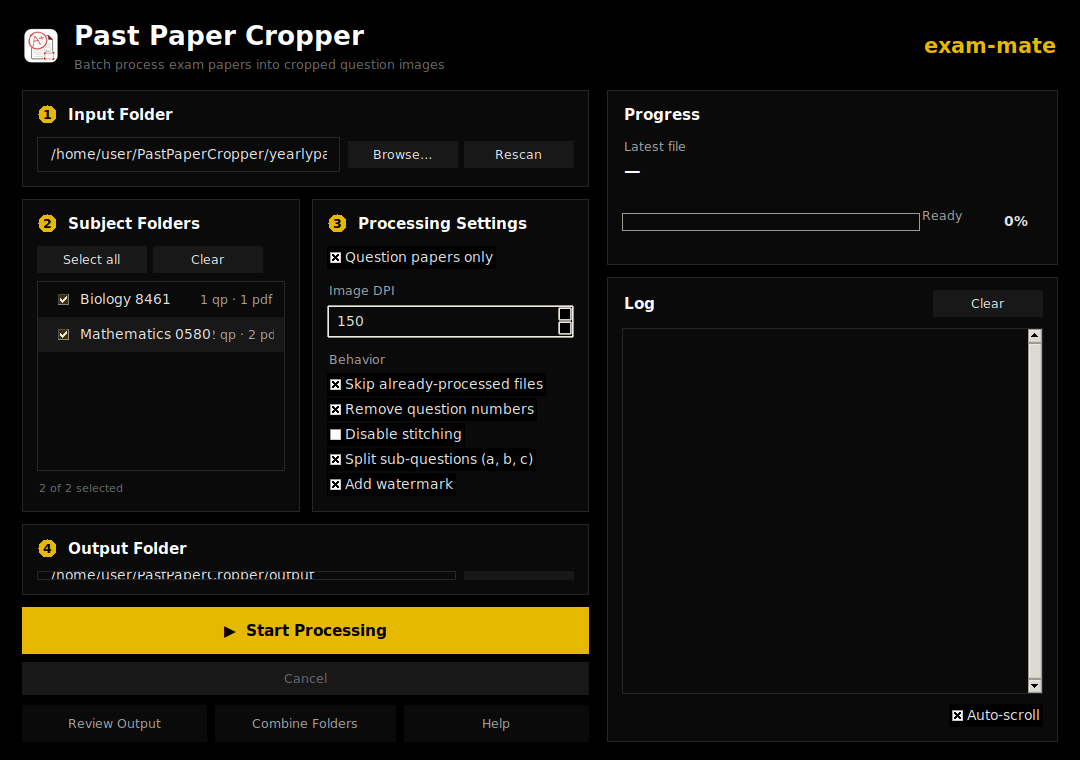
It started life as a plain CLI tool, which was fine for me but useless for anyone who isn’t comfortable in a terminal. So I added a Tkinter GUI: pick a folder, tick a few options, and it batch-processes everything with a progress bar.
The automatic detector isn’t perfect, so I built a manual review window on top of it, draggable bands you can drag up or down to fix a bad crop by hand, with zoom, pan, keyboard shortcuts, and a side-by-side view of the original page next to the crop so you can see exactly what it’s supposed to look like. There’s also a “Combine Folders” feature that merges several separate cropping runs into one output, coalescing subjects and folding metadata together, useful once you’ve run the tool on a few different batches of papers and want everything in one place.
Eventually I packaged the GUI as a standalone desktop app with PyInstaller, for both Mac and Windows, and set up a GitHub Actions workflow that builds and publishes those automatically on every push to main. That part mattered to me because the whole point was to make this usable by people who have never touched Python, not just something I run from my own terminal.
Testing it against reality
At some point I just threw the entire IGCSE past paper catalogue at it as a stress test, every subject, every session I could get my hands on. That surfaced a bunch of edge cases the smaller test set never would have: weird filename formats, papers where the question numbering resets partway through, sub-questions that span multiple pages. Most of the fixes since then have come out of that batch run rather than anything I could’ve predicted up front.
What’s next
There are still edge cases I’m chasing, tables and diagrams that occasionally break across page boundaries in odd ways, and I’d like to get more exam boards supported beyond Cambridge and AQA. It’s still private while I keep poking at it, but it’s already the thing I actually use when I’m putting together practice sets, which is really the only bar that mattered to me when I started.